Cost analytics & prompt history
Two widgets answer the questions every heavy Claude Code user eventually asks: where is the money going? and where did I put that prompt?
Cost analytics
Press Alt+4 (or open it from the rail) for a floating cost dashboard built from the Shadow DB turn records.
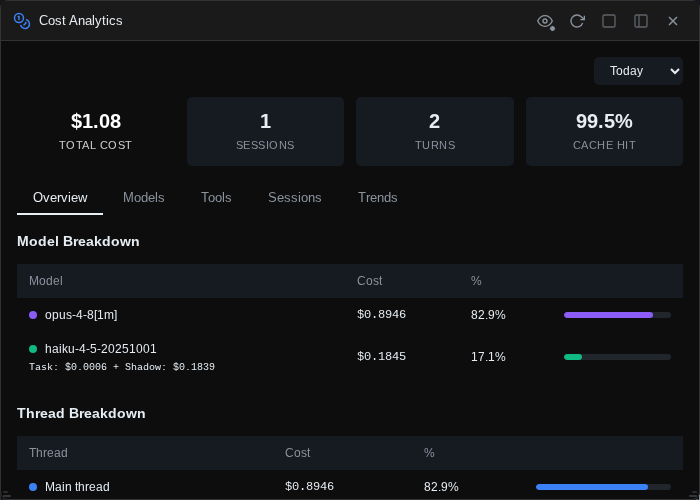
A time range selector at the top scopes everything: All Time, Today (the default), 7 Days, 14 Days, or 30 Days. Below it, four summary cards show total cost, session count, turn count, and the prompt-cache hit rate.
Five tabs break the numbers down:
- Overview — cost per model (Opus / Sonnet / Haiku, with Haiku split into task vs. Shadow Git overhead), a thread breakdown (main thread vs. Task subagents vs. Shadow Git journaling), top projects, and headline efficiency metrics (cost per turn, work efficiency, cache savings).
- Models — a card per model with input/output token totals, call counts, cache read/write volumes, and effective cost per 1k tokens.
- Tools — cost attributed proportionally to the tools used in each turn: which of Read, Bash, Edit, … is actually driving your spend, with per-invocation averages.
- Sessions — your top 10 most expensive sessions, each with a per-model cost breakdown.
- Trends — a daily bar chart of spend over the selected window.
Shadow Git overhead is broken out, not hidden
The Haiku calls that write your Shadow Git journal cost money too. The dashboard shows them as a separate "Shadow git" line everywhere Haiku appears, so you always know what the journal costs you.
Prompt history
Press Alt+P (or Ctrl+R, shell-style) to open the prompt explorer — full-text search over every prompt you have ever sent, across all projects and sessions.
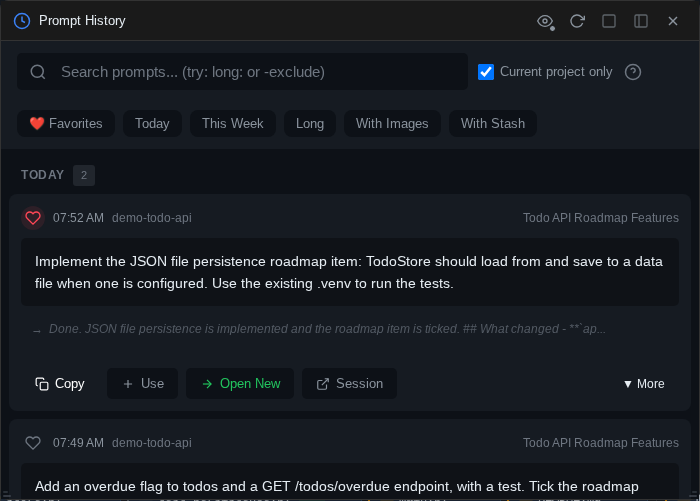
Without a search, prompts are grouped by time period (Today, Yesterday, This Week, This Month, Older) and quick-filter chips offer one-tap views: Favorites, Today, This Week, Long, With Images, With Stash. A "current project only" checkbox (on by default) scopes results to the active session's project.
Search syntax
Plain words are ANDed; everything else is operators. The ? button next to the search box shows this same list in-app, and clicking a syntax hint inserts it into the query. Active operators appear as removable filter chips under the box.
| Syntax | Meaning |
|---|---|
"exact phrase" |
Exact phrase match |
-term |
Exclude term |
word1 OR word2 |
Either term |
in:response |
Search Claude's responses instead of your prompts |
fav: |
Favorited prompts only |
long: / short: |
Long (>500 chars) / short (<100 chars) prompts |
has:image / has:stash |
Prompts with images / with stash context attached |
today: / yesterday: / week: |
Time shortcuts |
after:2026-01-15 / before:2026-01-10 |
Date bounds |
project:name |
Filter by project name (partial match) |
Matches are highlighted in the results.
Working with results
Each prompt card shows when and in which project/session it was sent, the first ~300 characters, any attached stash references, and a one-line preview of Claude's response. The ♥ heart marks a prompt as a favorite (searchable with fav:). More expands the card to the full prompt and fetches the complete rendered response.
Four actions per card:
- Copy — prompt text to the clipboard.
- Use — paste it into the current session's input (double-clicking the card does the same).
- Open New — start a fresh session in the prompt's original project with the text pre-filled, ready to edit and re-run.
- Session — open the original session and scroll to that exact prompt.
Other inspection widgets
A few more panels for looking under the hood:
Log explorer (Alt+L) — the current session's logs in three tabs: parsed Messages, the Raw JSON stream between the bridge and the CLI (rendered as a collapsible JSON tree), and large Tools outputs stored on disk. Supports pagination, role/error filtering, and sort order toggling — the closest thing to a flight recorder for a session.
Active sessions (Alt+S) — a monitor of every Claude process the bridge is running: your sessions with their process state, background instances (like the Shadow Git summary forks) with history, and aggregate success-rate stats.
Sub-agents — a runtime monitor for Task-tool sub-agents in the current session: each spawned agent as a card with its status, token usage, and an expandable log of the tool calls it made. (Distinct from the Agents widget, which manages agent definition files.)
Background tasks — lists shell commands Claude started in the background, with live-tailing output and task management. It has no default shortcut; open it from the rail or bind a key in Settings → Shortcuts.