Shadow Git journal
Every turn you run through pAInapple Code can be recorded — the file changes as a git commit, the intent as a structured, searchable summary. That record is the Shadow Git journal, and it's the closest thing this app has to a superpower: six weeks from now you can ask "when did we fix that auth bug, and why did we do it that way?" and actually get an answer.
What it is
Shadow Git is a parallel git repository per project, stored under the bridge's data directory (~/.painapple-code/projects/{hash}/shadow-git/) — completely separate from your project's .git. After each turn in which Claude touched files, the bridge stages everything and commits it to the shadow repo.
A few properties worth internalizing:
- It never touches your real git. No commits, no branches, no hooks in your repository. Your
git logstays exactly as you wrote it. The shadow repo even mirrors your branch: work onfeature-xand the turns land onshadow/feature-x. - It respects
.gitignore. The shadow repo uses your project as its work tree, so your ignore rules apply as usual — plus its own excludes for dependencies, build outputs, logs,.envfiles, and common disk-image formats (*.img,*.qcow2,*.iso, …). - Huge files are skipped. Any file over the size cap (50 MB by default) is left out of shadow commits and auto-added to the shadow repo's exclude list, so a VM image or media dump can't balloon the shadow object store. Adjust per project with
shadow_git.max_file_size_mbin the project config (0disables the cap). - It captures everything that changed in a turn, however it changed — Edit tool, a shell script Claude ran, a code generator — not just tool-tracked writes.
- It records per turn, not per save. One prompt → one commit, tagged with the session ID. That granularity is what makes "undo that turn" and "what did this session do?" meaningful questions.
Rich commits: the Haiku auto-journal
On top of the raw commits sits the second layer: rich commits. After each turn, the bridge forks a background summarizer (Haiku by default; the model is configurable in Settings) that reads the turn — with the running "journey" context of previous turn summaries — and writes a structured commit message: a one-line summary, tags, plus sections like work done, investigation, findings, decisions, problems solved, verification, and learnings. You can customize which sections are generated per project.
Everything is parsed and stored in a local DuckDB alongside the git data, so it's queryable: every turn's prompt, cost, tokens, duration, model, files touched, tools used, tags, and all the generated sections.
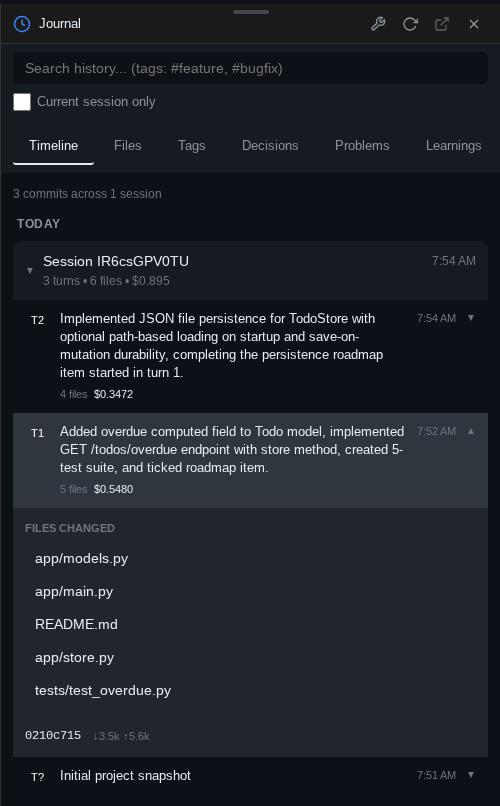
The whole app feeds off this record. The welcome screen's session cards get their names, one-line summaries, and tags from the journal; session search matches against summaries, not just prompts; and the next turn's summarizer receives the previous summaries as context, so the journal reads as a continuous narrative rather than isolated snapshots.
This is not a backup
The shadow commit is written after the summarizer fork finishes — a crash or server restart in between leaves a gap, and turns where Claude changed nothing produce no commit at all. Treat the journal as "what did I change last time?", never as disaster recovery. Keep real backups and a real git history.
Enabling it
Click the Auto-journal pill in the status bar (or open the Helpers widget) to reach the auto-journal control center. It shows the current state at a glance — Recording with enrichment, Recording (basic — no enrichment), or Disabled for this project — and holds the switches:
- Shadow git — the per-project master toggle for turn-by-turn recording.
- Rich commits — the summarizer fork. With it off you still get commits and diffs, just with basic messages and no searchable metadata. (Each fork is a small model call; its cost shows up per turn in the journal.)
- Sections — choose which generated sections rich commits include for this project.
- A link to system settings sets the defaults new projects inherit.
The same panel installs the optional helpers — the shadow-git and shadow-query CLIs and the shadow-git-helper agent. The journal records regardless; the helpers just add ways to query it. Installation is user-scoped (files in your home directory on the bridge server, no sudo) and the pill warns you when installed copies are outdated.
Browsing: the Journal widget
Press Alt+H to open the Journal (history explorer). A search bar with tag and file filters — and a current session only toggle — sits above six tabs:
- Timeline — every journal commit, grouped by session. Expand a turn to read its full summary and load its diff; the ⋯ menu jumps to the session, opens it in a new tab, shows the session log, or copies the commit hash / session ID.
- Files — pick any file for its full history across all sessions: every turn that touched it, with per-version diffs (Open in diff tool hands the pair to the diff viewer).
- Tags — the generated tag cloud; click a tag to list every turn that carries it.
- Decisions — every architectural decision the summarizer recorded, across all time.
- Problems — bugs fixed and how.
- Learnings — gotchas and discoveries worth not re-learning.
The Decisions / Problems / Learnings tabs are the sleeper hit: they answer "why is the code like this?" questions that no diff can.
Getting a file (or a turn) back
Because every turn is a commit, every version of every file Claude ever touched is recoverable:
- In the UI, open a file's History tab in the file preview and step through snapshots, or diff any two versions via the history bar and Compare Wizard.
-
From the terminal,
shadow-gitpasses any git command through to the shadow repo: -
Via the API,
POST /api/shadow/sessions/{id}/undoreverts a session's last turn andPOST /api/shadow/restorerestores chosen files from a given commit — see the API reference.
Or skip the plumbing and ask Claude: "restore utils.py to how it was before the last turn — check the shadow git."
Querying the journal
For questions the widgets don't answer, go straight at the DuckDB. The shadow-query helper wraps the bridge's read-only SQL endpoint (POST /api/shadow-db/sql — any DDL/DML is rejected):
shadow-query "SELECT started_at, user_prompt[:80], cost, model
              FROM turns ORDER BY started_at DESC LIMIT 10"
What did last week cost, which tags dominate, which files churn the most — it's all one SELECT away. The table layout and more examples are in the API reference.
Let Claude do the digging
The installed shadow-git-helper agent is a "code archaeologist" that knows the shadow repo's layout and commands. Type # in the chat input and pick it, or just write "consult shadow-git-helper about when the session-store migration happened" — Claude spawns a subagent that searches the history and reports back, keeping the research out of your main context window. Details in Optional helpers.